Chapter 1. Replacing One-by-One Customer Follow-Up
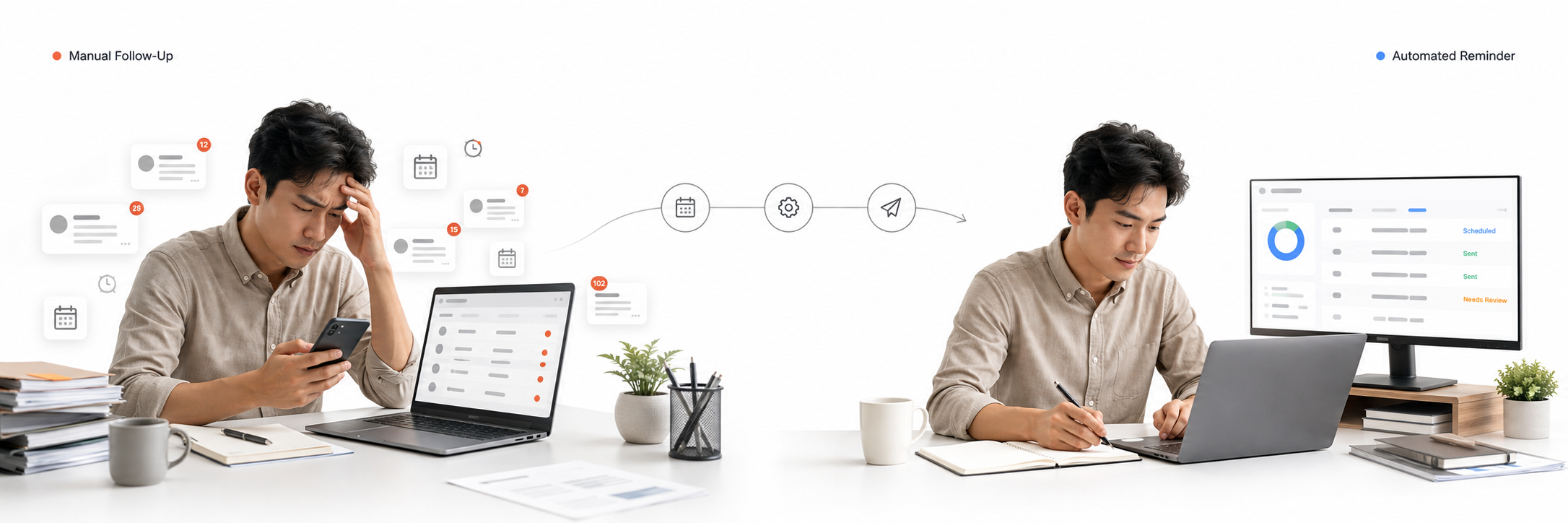
Filter replacement depends on timely follow-up after a purchase. Previously, the owner had to review past sales and remind customers one by one when a refill period approached. The work consumed operational time, was difficult to perform consistently, and provided no shared delivery state for messages that succeeded, failed, or remained uncertain.
Brill Auto Reminder was developed as a separate automation layer on top of the structured purchase records produced by Stock Management. Its responsibility begins when a reminder exists: determine when it is due, prepare the correct message, send it through WhatsApp under controlled conditions, and preserve enough delivery evidence for safe follow-up.
Chapter 2. Establishing Reminder Eligibility and Consent
Once Stock Management hands off an eligible purchase record, Brill Auto Reminder evaluates whether it can safely become a scheduled customer follow-up. The reminder retains a traceable reference to the original sale and carries forward the customer, normalized phone number, vehicle, filter type, quantity, purchase date, and sales source needed by the later delivery workflow. Its due date is calculated from the configured replacement interval, with nine months used as the default for stock-generated Filter AC reminders. Administrators can still create or adjust a reminder when an operational exception requires it, without changing the automated handoff into the normal path.
Eligibility is not determined by the due date alone. Consent evidence is stored explicitly with each reminder rather than assumed when the worker is ready to send, and the recorded source distinguishes stock-generated consent from an administrator-created reminder. This gives the delivery workflow a concrete reference to validate before contacting a customer. A scheduled reminder should therefore be understood as a controlled candidate for follow-up, not automatic permission to send a message.
Chapter 3. Centralizing Reminder Operations
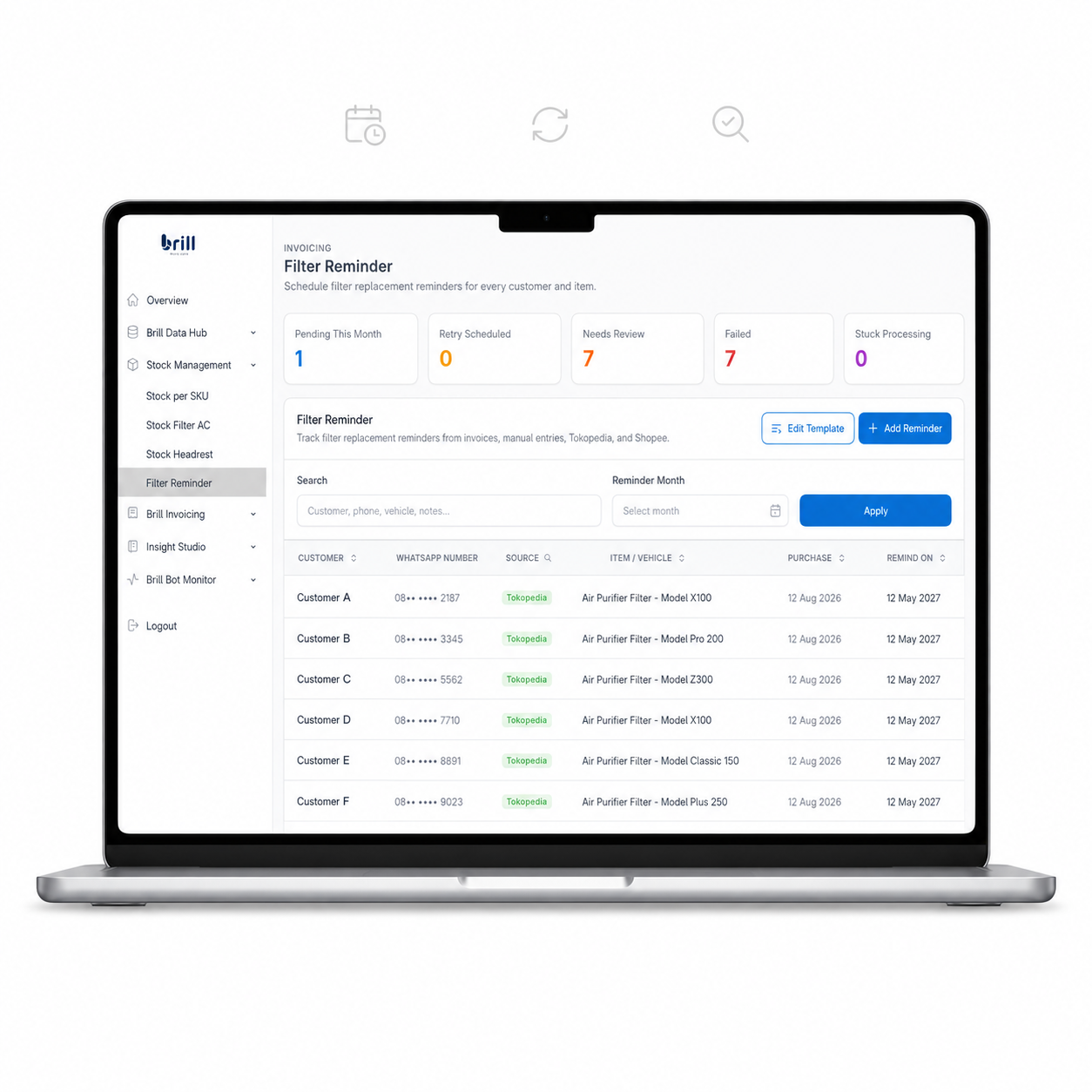
The Reminder Hub brings scheduled follow-up into the existing authenticated Brill Admin platform. Administrators can search, filter, sort, create, edit, and review reminder records from one operational workspace. Summary cards separate reminders that are pending this month, waiting for retry, in need of review, failed, or stuck in processing. This shared view gives the operator a clear distinction between routine scheduled work and cases that require manual attention.
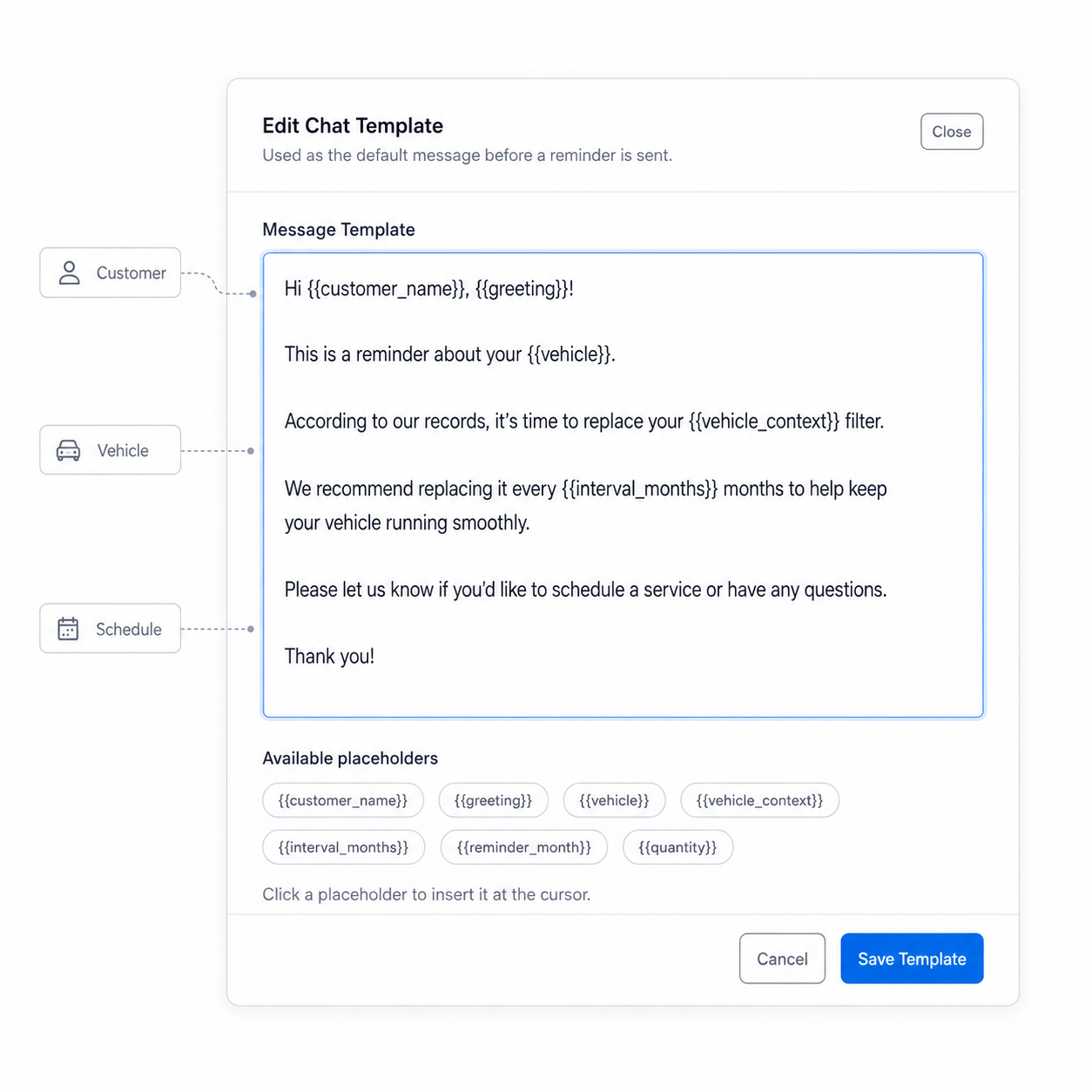
An editable active message template keeps customer communication consistent without forcing every reminder to use static wording. Contextual placeholders render values such as the customer name, time-based greeting, vehicle, replacement interval, reminder month, and quantity when the message is prepared. A live preview lets the operator review how the final message will read before saving the template. Template management remains inside the authenticated admin workflow, without exposing gateway credentials or provider delivery internals.
Chapter 4. Building a Controlled Scheduled Worker
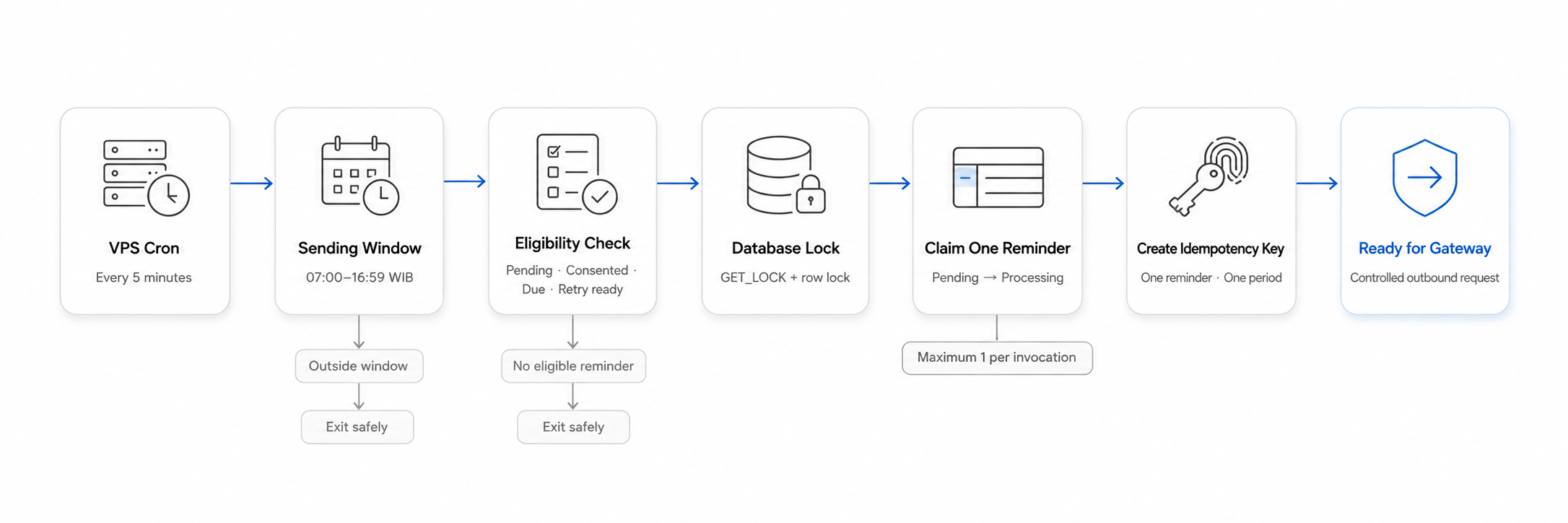
In production, a cron job on the VPS invokes the command-line worker every five minutes. The worker still enforces its own 07:00–16:59 Asia/Jakarta sending window, so an invocation outside that period exits without sending. Each valid invocation processes at most one eligible reminder, keeping outbound activity gradual and making individual attempts easier to audit and recover.
A candidate must be pending, consent-confirmed, due in the current month, within its retry schedule, and below the maximum attempt count. A MySQL named lock prevents concurrent worker processes from competing for the same queue. Before any network request, the selected row is locked and changed to processing inside a transaction. The worker assigns a random processing token, increments the attempt audit, and creates an idempotency key from the reminder and reminder period.
A phone that was already sent a reminder that day, or still has an unresolved processing or unknown operation, is excluded from automatic selection. Together, the VPS cron schedule, controlled one-item claim, database locking, and idempotency boundary allow the automation to run repeatedly without treating every cron invocation as permission to send blindly.
Chapter 5. Building a Safe WAHA Delivery and Recovery Flow
WAHA is a self-hosted WhatsApp HTTP API that acts as a bridge between the reminder application and the messaging service. In this workflow, the PHP application does not need to understand the internal mechanics of a WhatsApp session; it sends a structured server-side request and receives provider events through a controlled interface. I treated WAHA as one delivery component rather than the complete reminder solution because scheduling, consent, duplicate prevention, auditability, and recovery still belong to the surrounding application. WAHA is also not the official WhatsApp Business API, so the integration must be operated with an honest understanding of its platform and account risks.
WAHA runs inside a dedicated Docker container on the VPS, separating its runtime and session lifecycle from the PHP admin and gateway code. If the VPS is an office building, the container is a room prepared specifically for WAHA: it has a defined environment and controlled doors to the surrounding system. This boundary makes the service easier to start, inspect, restart, and update without rebuilding the reminder administration layer. The browser never contacts the container directly because all provider communication remains behind authenticated server-side endpoints.
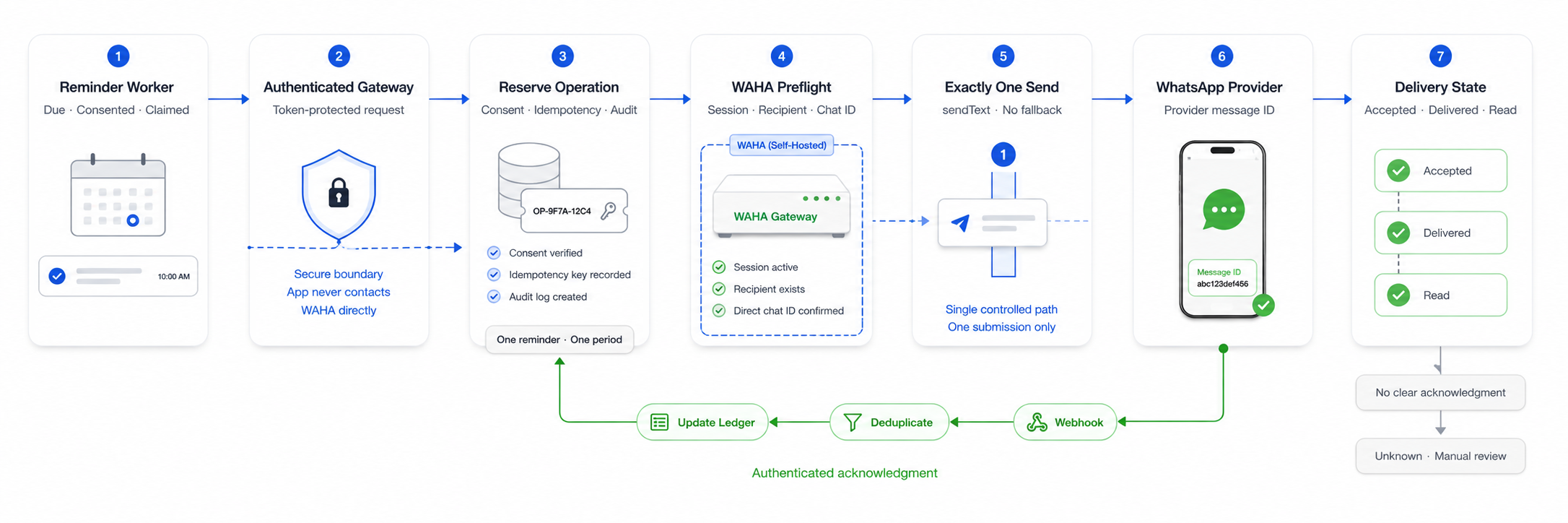
The reminder worker sends a token-protected request to a separate gateway containing the normalized recipient, rendered message, consent evidence, reminder reference, and idempotency key. Before contacting WAHA, the gateway reserves an outbound operation for audit and duplicate prevention, then verifies the expected engine, working session, recipient existence, and exact direct chat identifier. Only one sendText submission is permitted, and a provider message ID is required as evidence that WAHA accepted the request. There is no automatic fallback route that could silently convert one reminder into multiple provider submissions.
Provider acceptance is not treated as complete proof of delivery. Authenticated and deduplicated webhook acknowledgments update the outbound ledger through accepted, delivered, read, or failure states, while clear temporary failures follow a bounded retry schedule. Timeouts and ambiguous responses become unknown and stop for manual review because the original message may already have been accepted. Request order, authentication, phone normalization, preflight behavior, provider ID parsing, one controlled real send, and acknowledgment handling were reviewed before the workflow reached its first live trial in August 2026.
Chapter 6. Operational Result
The completed workflow changes refill follow-up from a list of messages the owner must initiate individually into a supervised operational queue. Due reminders, retry schedules, uncertain outcomes, and delivery health can be reviewed from one system while consent, locking, idempotency, and provider acknowledgment operate behind the interface. Clear failures can follow a bounded recovery path, whereas ambiguous results remain visible for manual review instead of being hidden behind a generic success message.
The practical result is not that human involvement disappears, but that repetitive work is automated while judgment is concentrated on exceptions. The owner can spend less time compiling follow-up lists and sending the same message repeatedly, while still retaining control over templates, reminder records, retries, corrections, and cancellations. These outcomes are supported by the implemented workflow and first controlled live trial; no unsupported conversion, revenue, or message-volume claim is attached to them.